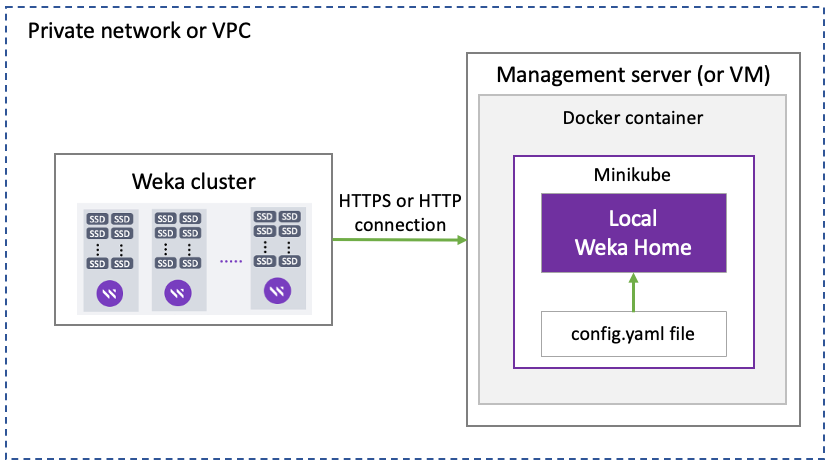
`
2. From the `wekahome_offline` directory, run:\
`./update_config.sh`
3. Open the `/root/.config/wekahome/config.yaml` file and set the following:
#### Domain
Set the domain for URL accessing the Local Weka Home portal either by the organization domain FQDN (DNS-based) or IP address (IP-based).
The URL to access the Local Weka Home does not accept aliases of the DNS name. Only the name configured in the `config.yaml` can be used for accessing the Local Weka Home.
DNS-based domain setting:\
In the **domain** section at the top of the file, set the domain FQDN after **@DOMAIN** as shown in the following example:
```
# TOP of file
domain: &DOMAIN "some.domain.com"
```
IP-based domain setting:\
In the **domain** section (at the top of the file) and the **alertdispatcher** section (at the end of the file), set the IP address of the domain as shown in the following example:
```
# TOP of file
domain: &DOMAIN "52.20.26.14"
# End of file
alertdispatcher:
email_link_domain_name: "52.20.26.14"
```
#### SMTP
To enable the Local Weka Home to send emails, set the SMTP details in the **smtp\_user\_data** section as shown in the following example:
smtp_user_data:
  sender_email_name: "Weka Home"
  sender_email: "weka-home-noreply@your-domain.com"
  smtp_host: "smtp.gmail.com"
  smtp_port: "587"
  smtp_username: "username@your-domain.com"
  smtp_password: "heslbgtrjhzfpdci"
  smtp_insecure_tls: false
  # false is the default. Change to true if a non-trusted SSL certificate is used
{% hint style="warning" %}
Ensure to enable the SMTP relay service in your SMTP service.
Once the Local Weka Home is deployed, you can set it to send alerts by email, SNMP, or PagerDuty. See the [Set the Local Weka Home to send alerts](broken://pages/JVhGKiVosYvNa7eMwnrI) topic.
{% endhint %}
#### Enforce HTTPS
To enforce HTTPS connection, change the value of `enabled:` to `true`, set the common name (CN, also known as FQDN), certificate data, and private key in the **tls** section (under the **nginx** section) as shown in the following section:
```
nginx:
tls:
enabled: true
# Must set to the CN of the certificate or wildcard
cn: "server.example.com"
cert: |
-----BEGIN CERTIFICATE-----
KJDDLJDLjdkm1718dljkdsljdh92edkjdjdjdkjddjsgsglgLQKSJDKDSKLKSf
.... Example of a truncated PEM encoded certificate .....
DDSHJkadsjkjask7U782CHDF8HD0ihjx8iwciw8wJHDSKDHIO
-----END CERTIFICATE-----
key: |
-----BEGIN PRIVATE KEY-----
MIIBOgIBAAJBAKj34GkxFhD90vcNLYLInFEX6Ppy1tPf9Cnzj4p4WGeKLs1Pt8
..... Example of a truncated private key .....
n5OiPgoTdSy7bcF9IGpSE8ZgGKzgYQVZeN97YE00
-----END PRIVATE KEY-----
```
{% hint style="info" %}
You can generate a self-signed certificate using the following example:\
`openssl req -x509 -newkey rsa:1024 -keyout key.pem -out cert.pem -days -nodes`
{% endhint %}
#### Events retention period
The default number of days to keep events in the Local Weka Home is 30 days. To reduce the consumption of disk space, you can specify the max\_age in the **events** section (under the **garbage collection** section), as shown in the following example:
```
garbage_collection:
support_files:
# max 365 days
max_age: 365d
events:
# max 30 days
max_age: 30d
```
5. Run `./wekahome-install.sh`.\
For new installation, it takes about 5 minutes.
6. Run `kubectl get pods` and verify in the results that all pods have the status **Running** or **Completed**. (To wait for the pods statuses, run `watch kubectl get pods`.)
7. Verify the Local Weka Home is installed successfully. Run the following command line:\
`helm status homewekaio -n home-weka-io`
Response example of a successful Local Weka Home installation
```
helm status homewekaio -n home-weka-io
NAME: homewekaio
LAST DEPLOYED: Thu Jan 5 09:30:42 2023
NAMESPACE: home-weka-io
STATUS: deployed
REVISION: 3
TEST SUITE: None
NOTES:
Thank you for installing home-weka-io.
Your release is named homewekaio
To learn more about the release, try:
$ helm status homewekaio -n home-weka-io
$ helm get all homewekaio -n home-weka-io
------------------------------------------------------------------------
Weka Home Frontend:
------------------------------------------------------------------------
URL:
https://172.31.46.11
Username:
admin
To obtain password, run:
kubectl get secret -n home-weka-io weka-home-admin-credentials -o jsonpath='{.data.admin_password}' | base64 -d
------------------------------------------------------------------------
Weka Home REST API:
------------------------------------------------------------------------
URL:
https://172.31.46.11/api/
------------------------------------------------------------------------
Weka Home Statistics (Grafana):
------------------------------------------------------------------------
URL:
https://172.31.46.11/stats/
Username:
admin
To obtain password, run:
kubectl get secret -n home-weka-io weka-home-grafana-credentials -o jsonpath='{.data.password}' | base64 -d
------------------------------------------------------------------------
Weka Home Encryption Secret Key
------------------------------------------------------------------------
To obtain secretkey, run:
kubectl get secret -n home-weka-io weka-home-encryption -o jsonpath='{.data.encryption_secret_key}' | base64 -d
------------------------------------------------------------------------
Technical information
------------------------------------------------------------------------
Number of event store databases: 1
Easy wekahoming!
```
### 6. Access the Local Weka Home portal and Grafana
* The Local Weka Home URL is `https://`
* The Grafana URL of the Local Weka Home is `https:///stats/`
* The Weka Home REST API URL is `https:///api/`
* The user name for accessing the portals is `admin`.
* To obtain the password for accessing the Local Weka Home portal, run the following command:\
`kubectl get secret -n home-weka-io weka-home-admin-credentials -o jsonpath='{.data.admin_password}' | base64 -d`
* To obtain the password for accessing the Local Weka Home grafana portal, run the following command:\
`kubectl get secret -n home-weka-io weka-home-grafana-credentials -o jsonpath='{.data.password}' | base64 -d`
* To obtain the secret key of the Local Weka Home portal, run the following command:\
`kubectl get secret -n home-weka-io weka-home-encryption -o jsonpath='{.data.encryption_secret_key}' | base64 -d`
### 7. Enable the Weka cluster to send information to the Local Weka Home
By default, the Weka cluster is set to send information to the public instance of Weka Home. To get the information in the Local Weka Home, set in the Weka cluster the URL of the Local Weka Home.
Connect to the Weka cluster and run the following command:\
`weka cloud enable --cloud-url https://`
### 8. Test the deployment
The Weka cluster uploads data to the Local Weka Home periodically and on-demand according to its information type (see the [Which information is uploaded to the Weka Home](/4.0/support/the-wekaio-support-cloud.md#which-information-is-uploaded-to-the-weka-home) section).
Access the Weka Home portal and verify that the test data appears.
To trigger a test event, run `weka events trigger-event test` and verify the test event is received in the Local Weka Home portal under the **Events** section.
## Upgrade the Local Weka Home
The Local Weka Home upgrade workflow is similar to the deployment workflow (but without reinstalling the Minikube).
**Procedure:**
1. Download the latest Local Weka Home package (*wekahome-vm-docker-images*). See the location in [Download the Local Weka Home and Minikube packages](#2.-download-the-local-weka-home-and-minikube-packages)*.*
2. Unpack the Local Weka Home package to the same directory used for installing the LWH. `tar xvf -C `
3. From the `wekahome_offline` directory, run `./update_config.sh`
4. If you want to modify the existing configuration, open the `/root/.config/wekahome/config.yaml` file and modify the settings (as described in [Install and configure Local Weka Home](#4.-install-and-configure-local-weka-home)).
5. Run `./wekahome-install.sh`. For an upgrade, it takes about 2 minutes.
6. Run `kubectl get pods` and verify in the results that all pods have the status **Running** or **Completed**. (To wait for the pods statuses, run `watch kubectl get pods`.)
7. Verify the Local Weka Home is upgraded successfully. Run the following command line:\
`helm status homewekaio -n home-weka-io`
## Modify the Local Weka Home configuration
Suppose there is a change in the SMTP server in your environment, or you need to change the events retention period or any other settings in the Local Weka Home configuration, you can modify the existing `config.yaml` with your new settings and apply them.
**Procedure:**
1. Open the `/root/.config/wekahome/config.yaml` file and modify the settings (as described in [Install and configure Local Weka Home](#4.-install-and-configure-local-weka-home)).
2. Run `./wekahome-install.sh`
3. Run `kubectl get pods` and verify in the results that all pods have the status **Running** or **Completed**. (To wait for the pods statuses, run `watch kubectl get pods`.)
4. Verify the Local Weka Home is updated successfully. Run the following command line:\
`helm status homewekaio -n home-weka-io`
## Troubleshoot the Local Weka Home deployment
### Symptom: browsing to the Local Weka Home returns an error
The probable cause can be, for example, a communication problem.
#### Resolution
1. Retrieve the ingress pod (controller) of the Local Weka Home.\
`kubectl get pods -n ingress-nginx -o name|grep controller`
2. Retrieve the logs and look for the error.\
`kubectl logs -n ingress-nginx > nginx.out`
### Symptom: when executing any command on the Local Weka Home, the error “no space left” is displayed
The probable cause for this issue is that the docker root dir (/var/lib/docker) consumes disk space.
#### Resolution
Do one of the following:
* Resize the disk and reinstall the Local Weka Home.
* Relocate the docker root directory path to a new path on a larger device (if it exists) and copy the content from the old path to the new path.
### Symptom: when testing the integration, the email is not received
The probable cause can be issues related to the SMTP server, such as wrong credentials or recipient email address.
#### Resolution
1. On the **Integration** page, select **Test Integration**.\
Wait until an error appears.
2. Retrieve the logs and search for the error. On the Local Weka Home terminal, run the following command:\
``for dep in `kubectl get deployment -n home-weka-io -o name`; do echo -----$dep-----; kubectl logs $dep --all-containers=true --timestamps=true --since=5m ; done``
---
# Agent Instructions
This documentation is published with GitBook. GitBook is the documentation platform designed so that both humans and AI agents can read, navigate, and reason over technical content effectively. Learn more at gitbook.com.
## Querying This Documentation
If you need additional information that is not directly available in this page, you can query the documentation by asking a question.
Perform an HTTP GET request on the following URL with the `ask` and `goal` query parameters:
```
GET https://docs.weka.io/4.0/support/the-wekaio-support-cloud/local-weka-home-deployment.md?ask=&goal=
```
`ask` is the immediate question: it should be specific, self-contained, and written in natural language.
`goal` is what the user is ultimately trying to achieve, the reason they need the answer. Sharing it helps GitBook give you a better, more relevant answer. A goal is most helpful when it describes the outcome the user wants rather than restating the question. For example, with `ask=how do I create an API token`, a goal like `automate deployments from our CI pipeline` lets GitBook tailor the answer to that use case.
The response will contain a direct answer to the question and relevant excerpts and sources from the documentation.
Use this mechanism when the answer is not explicitly present in the current page, you need clarification or additional context, or you want to retrieve related documentation sections.