> For the complete documentation index, see [llms.txt](https://docs.weka.io/llms.txt). Markdown versions of documentation pages are available by appending `.md` to page URLs; this page is available as [Markdown](https://docs.weka.io/4.4/monitor-the-weka-cluster/the-wekaio-support-cloud/local-weka-home-overview.md).
# Local WEKA Home overview
Local WEKA Home is a private instance of WEKA Home deployed with a WEKA cluster in a private network.
In scenarios where a customer lacks connectivity to the public instance of WEKA Home, such as when the WEKA cluster is deployed in a dark site or VPC, WEKA offers the option to deploy a Local WEKA Home. This is a private instance of WEKA Home, hosted on a management server or VM, designed to meet your specific needs.
## **Key functions of Local WEKA Home**
The Local WEKA Home serves the following key functions:
* **Event management:** It receives events from the WEKA cluster, stores them locally, and allows event querying and filtering.
* **Multi-cluster monitoring:** It allows you to monitor multiple clusters within your organization.
* **Cluster overview:** The Local WEKA Home displays a comprehensive overview of your clusters and allows you to drill down into cluster telemetry data.
* **Alerting:** It triggers specific alerts based on predefined rules and supports integrated delivery methods, including Email (SMTP), SNMP, and PagerDuty.
* **Diagnostics support:** The Local WEKA Home receives support files (diagnostics) from the WEKA cluster, stores them, and makes them accessible for remote viewing by the Customer Success Team.
* **Usage and performance insights:** It receives usage, analytics, and performance statistics from the WEKA cluster, stores, displays, and enables querying and filtering this data.
## **Key features and capabilities**
Local WEKA Home offers the following features and capabilities, categorized as follows:
#### **Monitoring and insight features**
* **Cluster Insights:** Monitor and report on multiple clusters within your organization.
* **Statistics:** Display various cluster-wide statistics and health status information.
* **Event Data:** Access offline event data and associated details.
* **Diagnostics:** Access diagnostics, including event logs, syslog files, trace files, and container information.
* **Usage reports:** Download JSON-formatted Usage Reports and Analytics for analysis and support, including anonymized versions for data security.
#### **Alerting and integrations**
* **Custom rules:** Create custom rules for specific events and alerts and route them to predefined integrations.
* **Custom integrations:** Create destinations where you want alerts and events defined in the Rules page to be sent. These can be Email, PagerDuty, and SNMP Traps.
**Security and compliance controls**
* **Audit information:** View a list of audited activities.
* **Admin privileges:** Apply admin privileges for cluster management and maintenance.
* **User management:** Manage users, groups, and access permissions.
#### **Supportability and data management**
* **Data forwarding:** Forward data from the Local WEKA Home to the cloud WEKA Home for enhanced support and monitoring by the Customer Success Team.
* **REST API:** Use the RESTful API for automation and integration with your workflows and monitoring systems.
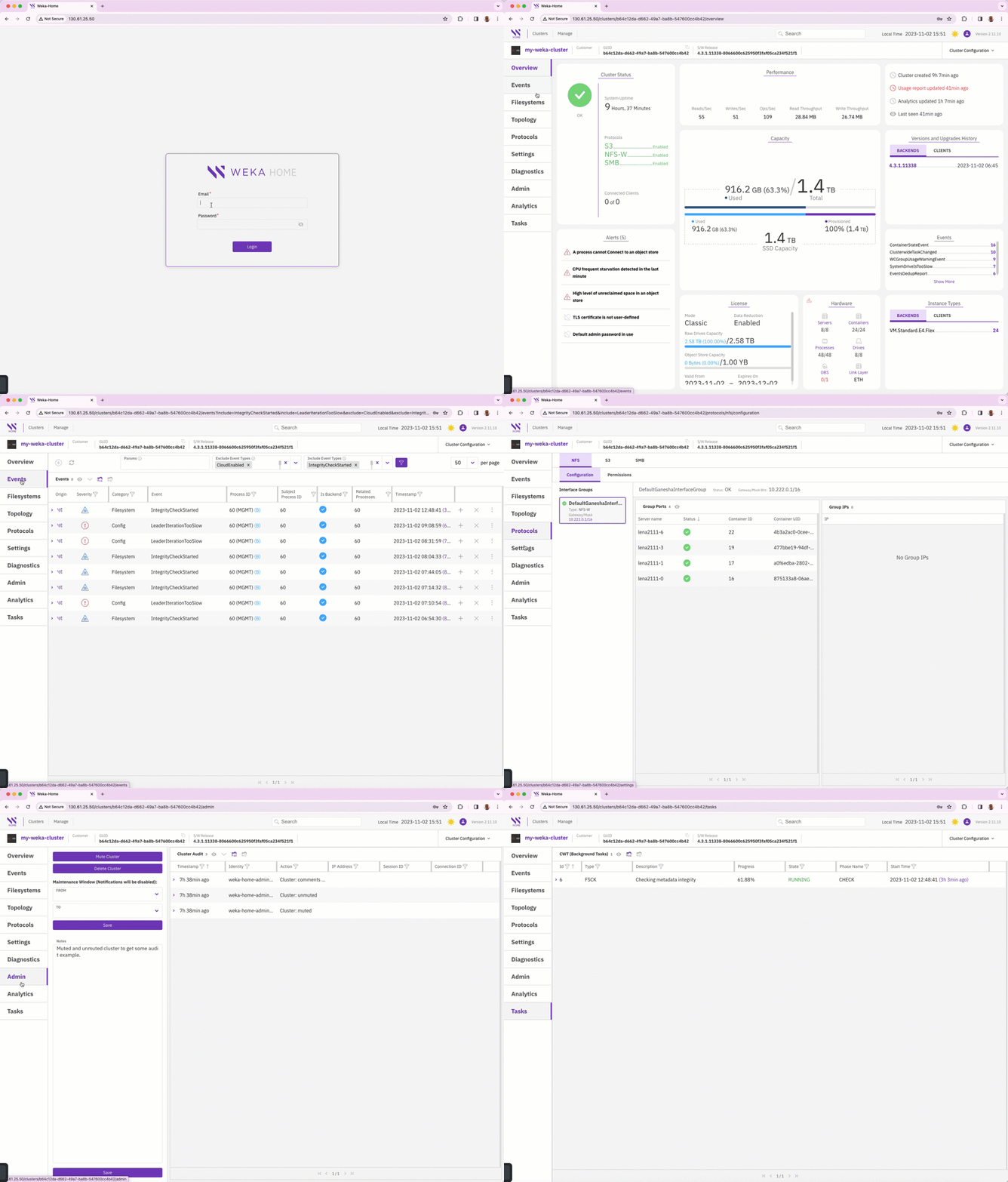
Local WEKA Home application overview
## Sign in to Local WEKA Home
Authentication methods:
* Local users
* GitHub SSO
Sign-in to Local WEKA Home
### Local user sign-in flow
1. Initiate sign-in
* Enter email and password
* Click **Login**
2. User validation
* Check email and password in internal LWH database
* Existing user: Direct sign-in
* Non-existent user: Return `401` error
3. Access granted
* Successful authentication
* Enter application
### GitHub SSO sign-in flow
GitHub SSO provides secure, streamlined authentication by:
* Centralizing user access management
* Simplifying login process
* Enforcing organizational access controls
* Reducing manual user provisioning
Sign-in steps:
1. Initiate sign-in
* Click **Sign in with GitHub**
* Redirect to GitHub authentication
2. GitHub authentication
* Grant access
* Retrieve public email
* No public email: Return `400` error
3. User validation
* Check email in internal LWH database
* Existing user: Direct sign-in
* New user:
* Validate email domain matches `emailDomain`
* Matching domain: Auto-create account
* Non-matching domain: Return `401` error
4. Access granted
* Successful authentication
* Enter application
**Related topics**
[Deploy Local WEKA Home on K3s](/4.4/monitor-the-weka-cluster/the-wekaio-support-cloud/local-weka-home-deployment.md)
[Explore cluster insights](/4.4/monitor-the-weka-cluster/the-wekaio-support-cloud/explore-cluster-insights-and-statistics.md)
[Manage alerts and integrations](/4.4/monitor-the-weka-cluster/the-wekaio-support-cloud/manage-alerts-and-integrations.md)
[Enforce security and compliance](/4.4/monitor-the-weka-cluster/the-wekaio-support-cloud/enforce-security-and-compliance.md)
[Optimize support and data management](/4.4/monitor-the-weka-cluster/the-wekaio-support-cloud/optimize-support-and-data-management.md)
---
# Agent Instructions
This documentation is published with GitBook. GitBook is the documentation platform designed so that both humans and AI agents can read, navigate, and reason over technical content effectively. Learn more at gitbook.com.
## Querying This Documentation
If you need additional information that is not directly available in this page, you can query the documentation by asking a question.
Perform an HTTP GET request on the following URL with the `ask` and `goal` query parameters:
```
GET https://docs.weka.io/4.4/monitor-the-weka-cluster/the-wekaio-support-cloud/local-weka-home-overview.md?ask=&goal=
```
`ask` is the immediate question: it should be specific, self-contained, and written in natural language.
`goal` is what the user is ultimately trying to achieve, the reason they need the answer. Sharing it helps GitBook give you a better, more relevant answer. A goal is most helpful when it describes the outcome the user wants rather than restating the question. For example, with `ask=how do I create an API token`, a goal like `automate deployments from our CI pipeline` lets GitBook tailor the answer to that use case.
The response will contain a direct answer to the question and relevant excerpts and sources from the documentation.
Use this mechanism when the answer is not explicitly present in the current page, you need clarification or additional context, or you want to retrieve related documentation sections.