> For the complete documentation index, see [llms.txt](https://docs.weka.io/llms.txt). Markdown versions of documentation pages are available by appending `.md` to page URLs; this page is available as [Markdown](https://docs.weka.io/5.1/appendices/weka-csi-plugin.md).
# WEKA CSI Plugin
Connect Kubernetes worker nodes to the WEKA data platform to leverage its capabilities.
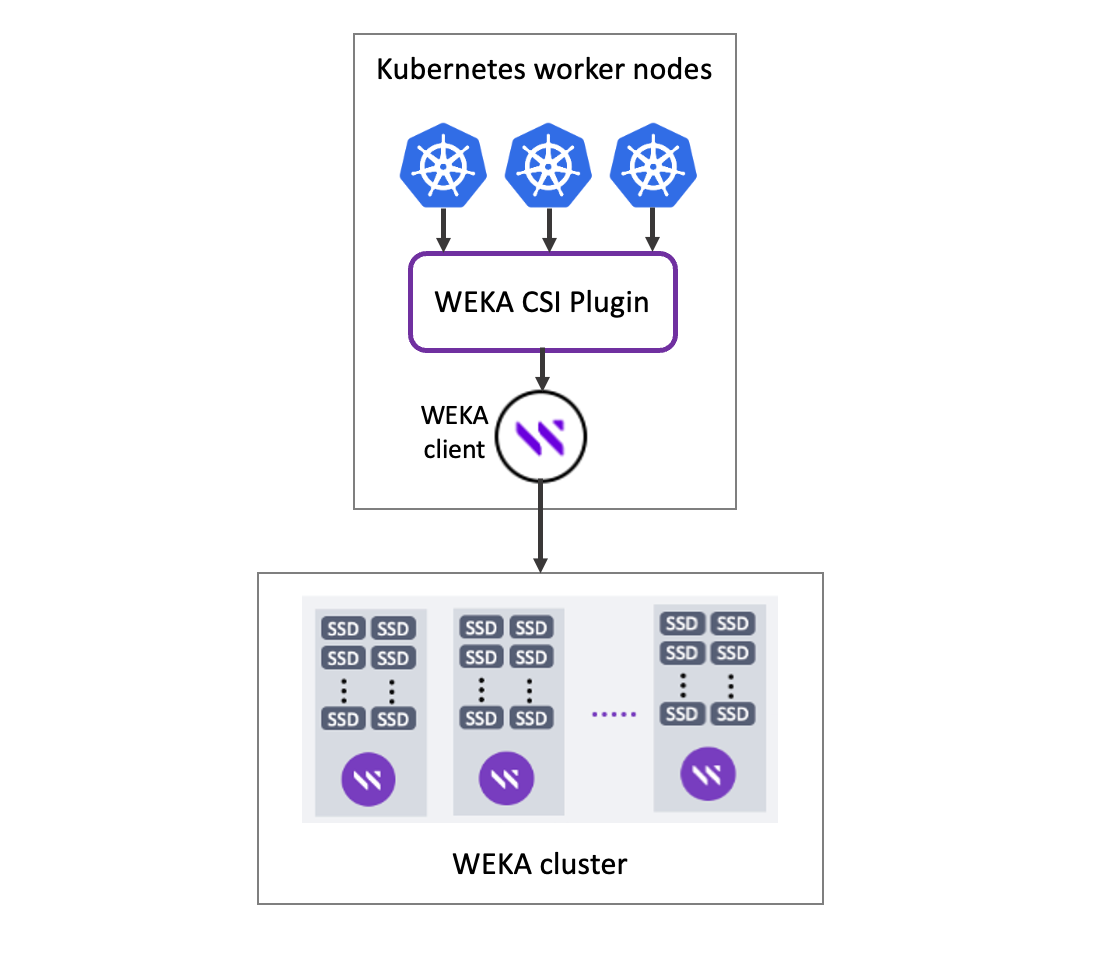
The WEKA CSI Plugin interfaces Kubernetes worker nodes and control plane with the WEKA clients. It enables the creation and configuration of persistent storage external to Kubernetes. It is based on the CSI Plugin standard.
What is the CSI Plugin standard?
The CSI (Container Storage Interface) Plugin is a standardized interface that enables container orchestration platforms, such as Kubernetes, to interact with different storage systems in a vendor-agnostic manner. CSI was introduced to address the challenges of integrating and managing storage in containerized environments.
For more details, see the [CSI standard specifications](https://github.com/container-storage-interface/spec/blob/master/spec.md).
The WEKA CSI Plugin provides the following features:
* Static and dynamic volumes provisioning.
* Mount a volume as a WEKA filesystem directory, a writable snapshot of an existing filesystem, or a whole filesystem.
* Support all volume access modes: ReadWriteMany, ReadWriteOnce, and ReadOnlyMany.
* Volume expansion.
* Snapshots and volume cloning.
* Quota enforcement on:
* Snapshot-backed persistent volumes in WEKA version 4.2 and up.
* Filesystem-backed persistent volumes in WEKA version 4.2 and up.
* Directory-backed persistent volumes in WEKA version 3.14 and up. See [Upgrade legacy persistent volumes for capacity enforcement](/5.1/appendices/weka-csi-plugin/upgrade-legacy-persistent-volumes-for-capacity-enforcement.md).
WEKA CSI Plugin implementation
## Interoperability
* CSI protocol: 1.0 - 1.2.
* Kubernetes: 1.18 - 1.3x.
* WEKA: V3.14 and up. WEKA V4.2 and up and WEKA CSI Plugin V2.0 are required to get all features.
* SELinux is supported (AppArmor for Ubuntu is not supported).
* Starting with WEKA CSI Plugin version 2.5.0, NFS transport is available. This option is intended for non-performance-critical scenarios or environments where installing the WEKA client is not feasible.
{% hint style="info" %}
The WEKA CSI Plugin replaces plugins developed earlier in the Kubernetes evolution. It replaces the `hostPath` method to expose WEKA mounts as Kubernetes volumes.
{% endhint %}
---
# Agent Instructions
This documentation is published with GitBook. GitBook is the documentation platform designed so that both humans and AI agents can read, navigate, and reason over technical content effectively. Learn more at gitbook.com.
## Querying This Documentation
If you need additional information that is not directly available in this page, you can query the documentation by asking a question.
Perform an HTTP GET request on the following URL with the `ask` and `goal` query parameters:
```
GET https://docs.weka.io/5.1/appendices/weka-csi-plugin.md?ask=&goal=
```
`ask` is the immediate question: it should be specific, self-contained, and written in natural language.
`goal` is what the user is ultimately trying to achieve, the reason they need the answer. Sharing it helps GitBook give you a better, more relevant answer. A goal is most helpful when it describes the outcome the user wants rather than restating the question. For example, with `ask=how do I create an API token`, a goal like `automate deployments from our CI pipeline` lets GitBook tailor the answer to that use case.
The response will contain a direct answer to the question and relevant excerpts and sources from the documentation.
Use this mechanism when the answer is not explicitly present in the current page, you need clarification or additional context, or you want to retrieve related documentation sections.