> For the complete documentation index, see [llms.txt](https://docs.weka.io/llms.txt). Markdown versions of documentation pages are available by appending `.md` to page URLs; this page is available as [Markdown](https://docs.weka.io/kubernetes/weka-operator-deployments/wekacluster-and-wekacontainer-lifecycle.md).

# WekaCluster and WekaContainer lifecycle

## WekaContainer lifecycle

The WekaContainer serves as the persistent data layer for WEKA processes in Kubernetes. Deleting a WekaContainer, whether gracefully or forcefully, permanently removes the data associated with that container.

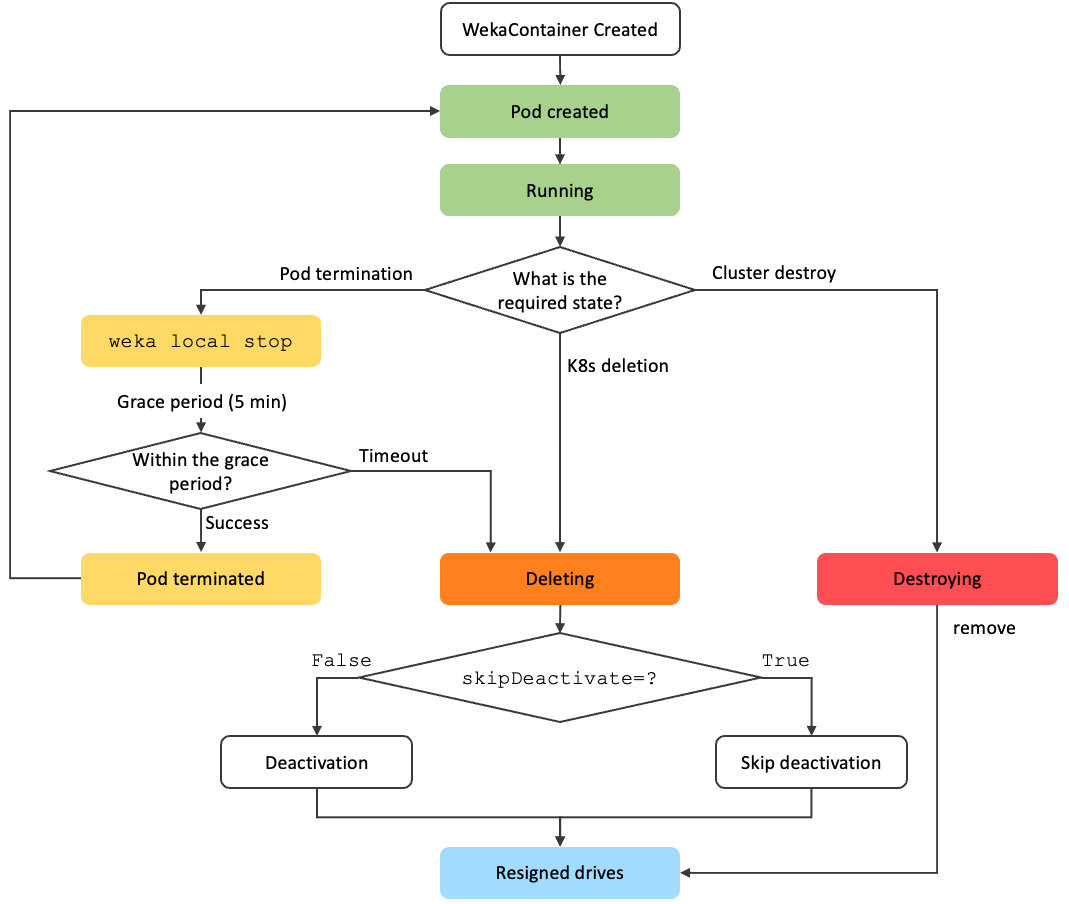
The following diagram shows the WekaContainer lifecycle from creation through running states and through the supported deletion paths.

<div data-with-frame="true"><figure><img src="/files/yFUfgUunERhEcxdIbzs4" alt=""><figcaption><p>WekaContainer lifecycle in Kubernetes</p></figcaption></figure></div>

### Deletion behavior

WekaContainers follow one of two deletion states:

* **`Deleting`**: Runs the graceful deactivation sequence before removal.
* **`Destroying`**: Removes the container immediately without deactivation.

The trigger determines the path:

* **Kubernetes resource deletion:** Deleting the `WekaContainer` resource starts the `Deleting` path.
* **Pod termination:** If the pod terminates while the `WekaContainer` resource still exists, Kubernetes first attempts a graceful stop with `weka local stop`. If the stop fails or times out, the container can move to `Deleting`. Because the resource still exists, the operator creates a replacement pod.
* **Cluster destruction:** Deleting the `WekaCluster` resource first moves containers into the cluster grace period. After `gracefulDestroyDuration` expires, containers move to `Destroying`. The `WekaCluster` resource is not deleted while a related `WekaClient` CR still exists.

The graceful `Deleting` path includes these deactivation steps:

* Cluster deactivation.
* For protocol containers (S3, SMB, NFS) removal from the protocol cluster

You can bypass deactivation by setting `overrides.skipDeactivate=true`, which routes the flow directly to resigned drives. This path is unsafe.

In both deletion paths, drives are resigned and become available for reuse. `Deleting` and `Destroying` are unhealthy states. If the parent resource still requires the container, the operator attempts a replacement. Data from the deleted container is permanently lost. If a drive WekaContainer is deleted or destroyed, the WEKA Operator immediately resigns its drives and makes them available for reuse by other WekaContainers.

## Resource relationship

Use the two resources together to interpret status:

* **WekaCluster**: Reflects cluster-level progress across all managed containers.
* **WekaContainer**: Reflects pod and WEKA process state for an individual container managed by a WekaCluster or WekaClient.

A WekaCluster reaches `Ready` only when its required WekaContainers reach `Running`. A WekaClient follows the same container pattern independently. You can add additional WekaContainers to the cluster later if needed.

## WekaCluster states

Monitor WekaCluster status with:

```bash
kubectl get wekacluster
```

The following are examples of WekaCluster states:

<table data-search="false"><thead><tr><th width="186">State</th><th>Meaning</th></tr></thead><tbody><tr><td><code>Init</code></td><td>The operator has received the WekaCluster CR and is initializing resources. No containers have been created yet.</td></tr><tr><td><code>WaitForDrives</code></td><td><p>Containers are running, but the cluster has not yet received enough signed drives to meet the <code>startIoConditions</code> threshold.</p><p>If the cluster remains in this stage for a long time, for example tens of minutes:</p><ol><li>Check that the number of drive WekaContainers matches the desired count.</li><li>Check that those containers are not in <code>PodNotRunning</code> state. This confirms the drives were assigned and the pods were scheduled.</li><li>If the drives still fail to attach, inspect the logs of the drive WekaContainers to determine why the drives were not added.</li></ol></td></tr><tr><td><code>StartingIO</code></td><td>The required drives are available. The cluster is forming and starting I/O.</td></tr><tr><td><code>Ready</code></td><td>The cluster is running and serving I/O.</td></tr><tr><td><code>Paused</code></td><td>The cluster is paused. All containers are stopped. The cluster does not serve I/O, but data is preserved.</td></tr><tr><td><code>GracePeriod</code></td><td>A deletion was requested. The cluster is protected for the duration of <code>gracefulDestroyDuration</code> (default: 24 hours) before destruction begins. To cancel, set <code>overrides.cancelDeletion: true</code>.</td></tr><tr><td><code>Destroying</code></td><td>The grace period has elapsed. The operator is actively removing cluster resources.</td></tr><tr><td><code>Deallocating</code></td><td>Resources, including drives and persistent storage, are being released.</td></tr></tbody></table>

**Normal deployment progression:**

`Init` → `WaitForDrives` → `StartingIO` → `Ready`

**Normal deletion progression:**

`Ready` → `GracePeriod` → `Destroying` → `Deallocating`

***

## WekaContainer states

Monitor WekaContainer status with:

```bash
kubectl get wekacontainer -o wide --all-namespaces
```

<table><thead><tr><th width="184">State</th><th>Meaning</th></tr></thead><tbody><tr><td><code>Init</code></td><td>The WekaContainer CR has been created. The operator has not yet scheduled a pod.</td></tr><tr><td><code>PodNotRunning</code></td><td>The pod has been scheduled but has not started. This includes image pull and node preparation.</td></tr><tr><td><code>PodRunning</code></td><td>The pod is running but the WEKA process has not started yet.</td></tr><tr><td><code>WaitForDrivers</code></td><td>The pod is running and waiting for the kernel driver to be loaded by the Drivers-Loader.</td></tr><tr><td><code>Starting</code></td><td>The kernel driver is loaded. The WEKA process is starting.</td></tr><tr><td><code>DrivesAdding</code></td><td>The container is joining the cluster and adding its drives.</td></tr><tr><td><code>Running</code></td><td>The WEKA process is running and healthy.</td></tr><tr><td><code>Degraded</code></td><td>The container is running but operating in a degraded state.</td></tr><tr><td><code>Unhealthy</code></td><td>The container is running but health checks are failing.</td></tr><tr><td><code>Error</code></td><td>The container has encountered an error. Check pod logs for details.</td></tr><tr><td><code>StoppingAttempt</code></td><td>The operator is attempting a graceful stop of the WEKA process.</td></tr><tr><td><code>Draining</code></td><td>The container is draining active mounts before shutdown. Applies to client containers during deletion.</td></tr><tr><td><code>Stopped</code></td><td>The WEKA process has stopped. The pod may still be running.</td></tr><tr><td><code>PodTerminating</code></td><td>The pod is terminating.</td></tr><tr><td><code>Paused</code></td><td>The container is paused as part of a cluster-level pause.</td></tr><tr><td><code>Destroying</code></td><td>The container is being removed without a deactivation step.</td></tr><tr><td><code>Deleting</code></td><td>The container is going through the full deactivation and deletion flow.</td></tr><tr><td><code>Completed</code></td><td>The container has finished its task. Applies to driver-builder and drive-signing containers only.</td></tr><tr><td><code>Building</code></td><td>The container is compiling a kernel driver. Applies to driver-builder containers only.</td></tr></tbody></table>

**Normal deployment progression:**

`Init` → `PodNotRunning` → `PodRunning` → `WaitForDrivers` → `Starting` → `DrivesAdding` → `Running`

**Normal client deletion progression:**

`Running` → `Draining` → `Stopped` → `PodTerminating` → `Deleting`

## Common stuck states

<table><thead><tr><th width="301">Stuck state</th><th>Likely cause</th></tr></thead><tbody><tr><td>WekaContainer stays in <code>PodNotRunning</code></td><td>Node does not match <code>nodeSelector</code>, insufficient resources, or image pull failure. Run <code>kubectl describe pod</code> on the pending pod.</td></tr><tr><td>WekaContainer stays in <code>WaitForDrivers</code></td><td>Driver distribution service is unreachable, kernel headers are missing on the build server, or the <code>driversDistService</code> URL is misconfigured. Monitor the progress of the <code>weka-driver-loader</code> pod on the same node.</td></tr><tr><td>WekaCluster stays in <code>WaitForDrives</code></td><td>Drives have not been signed, the <code>sign-drives</code> WekaPolicy has not been applied, <code>nodeSelector</code> on the policy does not match the target nodes, or a drive failed to attach to a drive WekaContainer. Inspect the logs of the relevant WekaContainers.</td></tr><tr><td>WekaCluster never reaches <code>Ready</code> from <code>StartingIO</code></td><td>A container is stuck in <code>Error</code>, <code>Degraded</code>, or <code>Unhealthy</code>. Check individual WekaContainer status.</td></tr><tr><td>WekaClient containers stuck in <code>Draining</code></td><td>Active mounts are preventing shutdown. Do not force-delete pods in this state: the operator will recreate them on the same node and the underlying issue remains.</td></tr></tbody></table>

{% hint style="info" %}
Do not use `kubectl delete pod --force` on WEKA pods. Force-deleting a pod does not remove the underlying WekaContainer resource. The operator immediately recreates the pod on the same node. To move or remove a container, delete the WekaContainer resource instead.
{% endhint %}

**Related information**

[WEKA CRD API Reference](https://weka.github.io/weka-k8s-api/)


---

# Agent Instructions
This documentation is published with GitBook. GitBook is the documentation platform designed so that both humans and AI agents can read, navigate, and reason over technical content effectively. Learn more at gitbook.com.

## Querying This Documentation
If you need additional information that is not directly available in this page, you can query the documentation dynamically by asking a question.

Perform an HTTP GET request on the current page URL with the `ask` query parameter, and the optional `goal` query parameter:

```
GET https://docs.weka.io/kubernetes/weka-operator-deployments/wekacluster-and-wekacontainer-lifecycle.md?ask=<question>&goal=<endgoal>
```

`ask` is the immediate question: it should be specific, self-contained, and written in natural language.
`goal` is optional and describes the broader end goal you are ultimately trying to accomplish on behalf of the user. GitBook uses it to tailor the answer towards what is most useful for that goal.

The response will contain a direct answer to the question and relevant excerpts and sources from the documentation.

Use this mechanism when the answer is not explicitly present in the current page, you need clarification or additional context, or you want to retrieve related documentation sections.
