> For the complete documentation index, see [llms.txt](https://docs.weka.io/llms.txt). Markdown versions of documentation pages are available by appending `.md` to page URLs; this page is available as [Markdown](https://docs.weka.io/weka-system-overview/cluster-capacity-and-redundancy-management.md).
# Cluster capacity and redundancy management
Understand capacity, redundancy, and failure-domain settings that protect the cluster.
Effective cluster capacity and redundancy management are crucial for ensuring data protection, availability, and optimal performance. This involves understanding key capacity metrics, redundancy configurations, and the system's mechanisms for handling failures.
## Key capacity terms
Understanding the terminology related to storage capacity is fundamental:
* **Raw capacity**: This represents the total physical storage capacity of all SSDs assigned to a WEKA cluster. For example, if a cluster has 10 SSDs, each with 1 terabyte of capacity, the raw capacity is 10 terabytes. This figure automatically updates when more SSDs are added (or removed) from the cluster.
* **Net (usable) capacity**: This is the actual space available on the SSDs for storing user data. The net capacity is derived from the raw capacity and is influenced by several factors:
* The chosen stripe width and protection level, which dedicate some capacity to system protection.
* The allocation for hot spares, reserved for redundancy and rebuilds.
* The WEKA cluster reserved capacity, allocated for internal system operations.
* **Provisioned capacity**: This refers to the total capacity that has been assigned to filesystems within the WEKA cluster. It includes capacity from both SSDs and any configured object stores.
* **Available capacity**: This is the remaining net capacity that can be used to allocate additional capacity to existing filesystems and create new filesystems . It is calculated by subtracting the provisioned capacity from the net capacity.
## Redundancy and protection levels
WEKA employs a distributed RAID system that supports a range of redundancy configurations. These are based on a **D+P model**, where D is the number of data blocks and P is the number of parity blocks. Together they form a **stripe**, the unit WEKA protects and rebuilds. A 6+2 configuration, for example, writes every stripe as 6 data blocks and 2 parity blocks.
The **data stripe width** (D) is the number of data blocks per stripe. A configuration written as 6+P has 6 data blocks per stripe, 16+P has 16 data blocks per stripe, and so on, where P is the selected protection level. Data blocks in a stripe are accessed in parallel by the cluster. A higher D value increases the theoretical I/O speed for a file.
The **protection level** (P) is the number of parity blocks written per stripe. A configuration written as D+2 has two parity blocks per stripe, D+3 has three parity blocks per stripe, and so on (where D is equal to whichever number of data blocks you choose).
The number of data blocks must always be greater than the number of parity blocks, so a 3+3 configuration is not allowed.
**What a protection level protects against**
The protection level is the number of **failure domains** the cluster can lose at the same time without losing data. Each block in a stripe is written to exactly one failure domain, so in a 6+2 cluster, when writing a new stripe, data for a file is written to **8** unique failure domains.
Beyond the configured **simultaneous failure protection** (N+2, N+3, or N+4), a WEKA cluster also exhibits resilience to [**serial failures**](#user-content-fn-1)[^1] of additional failure domains. This means that as long as each data rebuild operation completes successfully **and** there is sufficient **available** SSD capacity in the cluster, the system can tolerate subsequent serial failure domain losses.
For example: consider a cluster of 20 servers with a stripe width of 18 (16+2). After successfully rebuilding from a simultaneous failure of 2 failure domains, the cluster is **again** resilient to two additional simultaneous server failures. If further serial server failures occur, the system attempts to rebuild its data stripes using the remaining healthy servers to maintain the required stripe width (for example, 18).
Theoretically, this process can continue - subject to sufficient available SSD capacity - until a lower limit of healthy servers is reached. Failures beyond this critical threshold will result in the filesystem going offline.
In the event of serial server failures coupled with insufficient SSD capacity to complete rebuilds, the cluster attempts to **tier data** that currently resides on SSD out to its configured object stores. This is called [**backpressure mode**](#user-content-fn-2)[^2] where the tiering does not consider the age of the data (unlike normal, orderly tiering) but instead tiers data in an approximately random fashion. This process prioritizes data integrity by offloading data to an object store when SSD available capacity is critically low.
### Performance in a degraded state
Data protection keeps the filesystem available while one or more servers, containers, or drives are out of service. During that time, the cluster serves the workload with the remaining resources, so performance follows the resources in service.
If the workload uses the full capacity of the cluster, performance decreases in proportion to the resources out of service. For example, when 10% of the resources are out of service, performance decreases by 10%. If the workload uses less than the full capacity, performance stays the same as long as the remaining resources cover it.
The share of resources that one server represents depends on the cluster size. For example, one server is 1/8 of the backend resources of an 8-server cluster and 1/20 of a 20-server cluster. The same applies to planned maintenance that takes servers or containers out of service, such as a [rolling upgrade](/operation-guide/upgrading-weka-versions.md#non-disruptive-upgrade-ndu-overview).
### Failure domain folding
{% hint style="warning" %}
Folded failure domains present additional risk to a cluster's availability beyond the configured protection level. Ensure your cluster contains at least as many failure domains as the cluster stripe width + 1 (for example, **19** for a cluster with stripe size of 16 + 2).
{% endhint %}
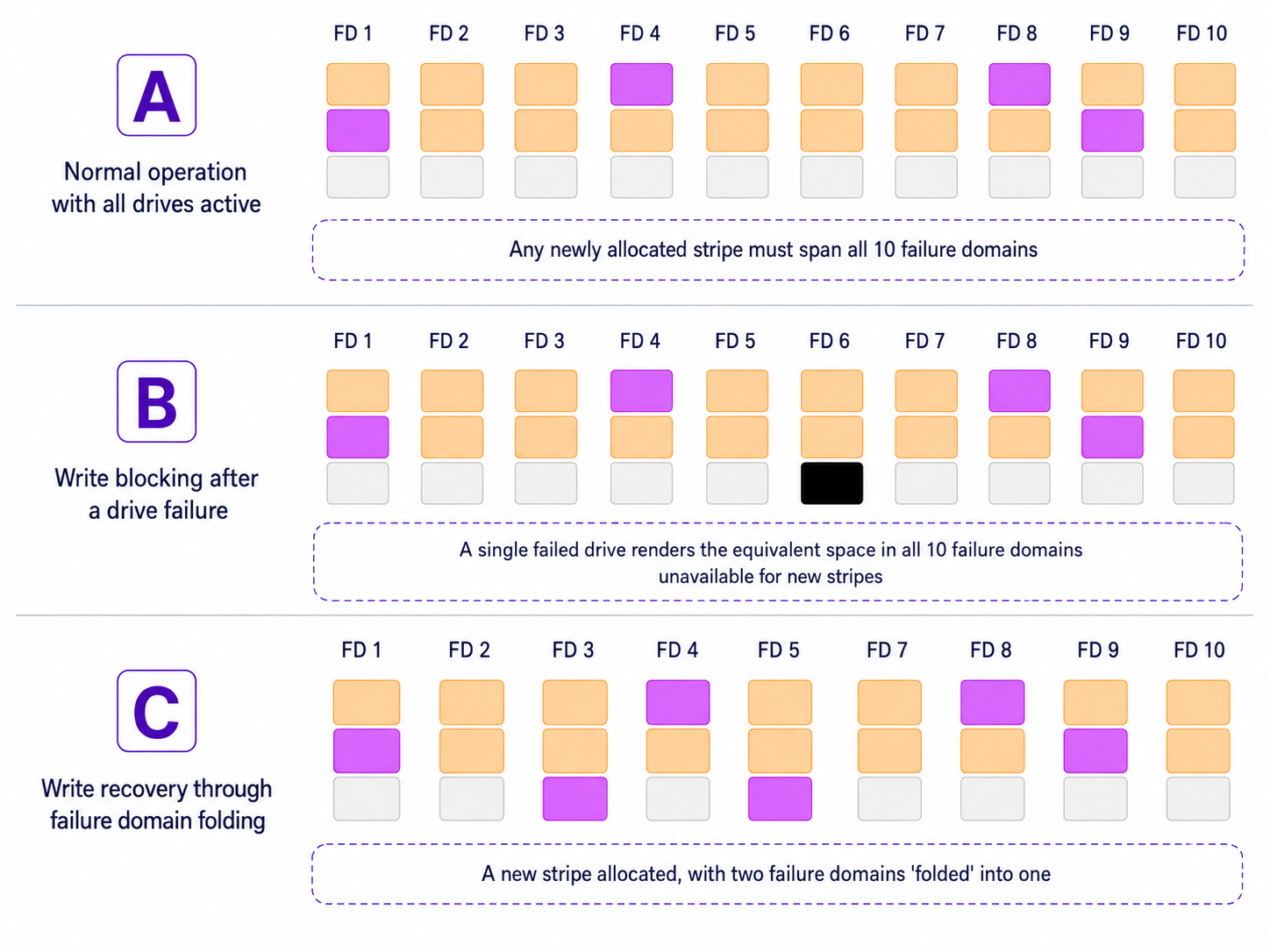
In scenarios where hardware failures persist and components are not replaced promptly, WEKA employs a process called **failure domain folding** to maintain write availability. This process temporarily relaxes the standard requirement that each RAID stripe must span only distinct failure domains (for example, one block per backend storage server within a stripe).
By allowing a single failure domain to effectively appear multiple times within a newly allocated stripe, the system can continue to allocate new stripes and accept write operations even when in a degraded state.
Failure domain folding is automatically triggered when the number of active (healthy) failure domains becomes insufficient to satisfy the original stripe width requirement, which typically occurs due to server deactivation or the loss of multiple drives. This adaptive approach ensures that the system can remain operational and continue to accept writes during extended fault conditions, without necessitating immediate hardware replacement.
The process can be visualized in three stages:
1. **Stage A: Normal operation (all drives active)**: In the initial state, all backend storage servers are operational. Each server is treated as a distinct failure domain. RAID stripes, consisting of data (yellow blocks) and parity (purple blocks), span horizontally across all available failure domains. New stripe allocations proceed normally, utilizing free space across all failure domains. The system is configured with hot spare capacity (equivalent to two full servers) allocated across the system.
2. **Stage B: write blocking after a drive failure**: When a single drive fails, any new stripe that must span all failure domains can no longer be allocated if any one domain lacks sufficient space due to the failure. Even though only one drive has failed, this strict allocation requirement can effectively block new writes. This results in a disproportionate loss of writable capacity relative to the actual size of the failure, particularly noticeable in systems with fewer drives per server.
3. **Stage C: Write recovery through failure domain folding**: To mitigate the blocked write condition, the affected storage server (failure domain) can be manually deactivated. This allows WEKA to apply failure domain folding. The system relaxes the one-domain-per-stripe rule, permitting the reuse of the same failure domain within a newly allocated stripe. This mechanism restores write capability without requiring immediate hardware replacement, ensuring continued system operation under degraded conditions.
Failure domain in action (example)
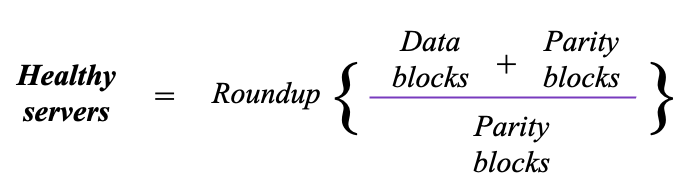
### Theoretical minimum required healthy servers
In the event of repeated serialized failures, a minimum number of healthy failure-domains is required for the cluster to remain operational. This is represented by the following formula:
**Examples:**
| Stripe data width + protection level | Minimum required healthy failure domains |
| ------------------------------------ | ---------------------------------------- |
| 5+2 | 4 |
| 16+2 | 9 |
| 5+4 | 3 |
| 16+4 | 5 |
{% hint style="warning" %}
This minimum is theoretical and does not take into account availability of other required cluster resources.
{% endhint %}
[^1]: **Serial failures:** Refers to a sequence where each data rebuild finishes before another server fails, ensuring one-at-a-time failure handling.
[^2]: Backpressure mode is an emergency response that helps a system continue functioning by offloading data to secondary storage when primary storage is insufficient.
---
# Agent Instructions
This documentation is published with GitBook. GitBook is the documentation platform designed so that both humans and AI agents can read, navigate, and reason over technical content effectively. Learn more at gitbook.com.
## Querying This Documentation
If you need additional information that is not directly available in this page, you can query the documentation by asking a question.
Perform an HTTP GET request on the following URL with the `ask` and `goal` query parameters:
```
GET https://docs.weka.io/weka-system-overview/cluster-capacity-and-redundancy-management.md?ask=&goal=
```
`ask` is the immediate question: it should be specific, self-contained, and written in natural language.
`goal` is what the user is ultimately trying to achieve, the reason they need the answer. Sharing it helps GitBook give you a better, more relevant answer. A goal is most helpful when it describes the outcome the user wants rather than restating the question. For example, with `ask=how do I create an API token`, a goal like `automate deployments from our CI pipeline` lets GitBook tailor the answer to that use case.
The response will contain a direct answer to the question and relevant excerpts and sources from the documentation.
Use this mechanism when the answer is not explicitly present in the current page, you need clarification or additional context, or you want to retrieve related documentation sections.